Tag Clouds, Useful or just Keyword Spam?
A tag cloud is a small summary of tags used throughout your website and can be implemented for several reasons: as an alternative navigation, to provide a quick overview of the website, article, pictures,… and an attempt to give the SEO (search engine optimization) a boost.
Tag clouds were used on a huge amount of websites back in the ’90 and early 2000, but in the last couple of years it is difficult to find some good working and nice looking examples.
It’s not because I expect a huge increase of tag cloud implementations, but before you do so you could read this article. You need to realise that tagging is not just about giving an article some random keywords.
To show you what can go wrong with tagging in general, I would like to take a great online tool as an example: Delicious. You have a collection of websites bookmarked – each with its own series of tags – and you keep adding websites to this collection.
Ever wondered which tags you gave to a similar website four days ago? Just to make sure, you’ve connected the website with a lot of specific tags and a few general ones, increasing the chance that you’ve created a common tag for the two websites. It’s is a normal reaction as you’re not always giving similar websites the same tags. Reason: at this moment you are in a slightly different state of mind watching website B than when you were visiting website A four days ago. Your tags keep piling up and before you know it you just want to delete everything and start bookmarking again, trying not to make the same mistake again.
Design of a tag cloud
By making variations in font size, colours and weight, you can display tags based on their importance, relevance, frequency of appearance in your website or article and how many times it was clicked. Tags which are infrequently used are considered less important and will result in a smaller font size, less weight and a lower colourcontrast.
As you can imagine, tag clouds come in different shapes and sizes but that is precisely what make these elements so difficult to read.
In fact research indicated that you don’t read a tag cloud, instead you scan for a word. The words in the largest font size stand out while the smaller ones are completely ignored.

Nevertheless, it’s an interesting piece of typographical design and it takes quiet a lot of effort to make it user friendly. In my opinion, the best way to achieve this is to keep it as simple as possible (remember one of the golden rules, less is more). Delicious is using a good example of a tag cloud. Just by using one colour and variating the opacity and fontsize gives you enough differentiation between each tag and a good overview. Another great feature is the ability to sort your tags alphabetically or by size.
Amount of tags in the tag cloud
The ultimate aim of a tag cloud is to offer a nice overview of your website or article. It is so easy to submit tags to a system – such as WordPress – but you really need to choose your tags more carefully. Also, when using too many tags it can be considered as keyword spam. Not fun for the visitors and even less fun for the search engines.
Interpretation of tags
The use of our natural language is ambigious. We give the same word different meanings, depending on how the word is used. For instance, it’s not clear whether the tag ‘design’ represents web design, graphic design or product design. Everyone gives this word a different meaning, depending on their surroundings. Before you start labeling data with tags you should think carefully about the meaning of the word.
Some websites (including mine) offer the visitors “related articles”. The connection between articles is most of the time formed by tags. If you implement tags the wrong way, the entire concept of having links to related content is good for nothing as the articles have nothing in common except the tag itself.
Contextual tags
A solution to avoid misinterpretation of tags is to see them in their context rather than individual keywords. Linking contextual related keywords (and the articles, pages, … which they represented) could be a huge improvement in the way we navigate through connected articles because it improves the relevance between these articles.
In our previous example of ‘design’, this tag will not only be connected with ‘web design’, ‘graphic design’ and ‘product design’ but also with ‘logo’, ‘illustrations’ and even ‘XHTML and CSS’ if the article is about little tips and tricks for redesigning your website. It speaks for itself that the connection between tags need to be very clear. Any vague connection will reduce the relevance of a tag in the global tag cloud.
Typo
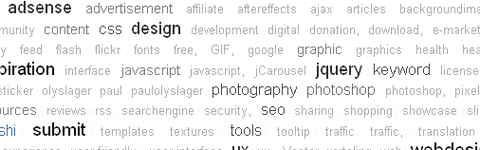
You need to be aware of the fact that even a small typo or misuse of upper -and lowercase can make a difference in the tagging story. Have a look at the picture below (taken from bloggingdeveloper.com): a tag cloud which contains both jquery and jQuery, each referring to different articles marked with jquery or jQuery.

SEO (search engine optimization):
In case you didn’t know, tag clouds do help when it comes down to SEO. Searchengines thrives on “corresponding” links (website A links to website B and vice versa) and although most tagclouds contain internal links to your posts, archives or pictures, doesn’t mean they are less important than external ones.
Search engine spiders use internal links to find all the pages of your website and by using the right keywords you can increase the relevancy of the page. When you increase the page rank of your internal pages separately, it will increase your site’s overall ranking.
When and how to use:
Using tags is a must, it gives you an idea of what the article is all about and offers a great way of navigating through related content. On top of that it is useful for SEO.
But think about these few things before implementing tags as a tag cloud:
- Make it easy to read. Meaning: not too many tags, not too many colours, keep the line height constant.
- Use a nice balance between specific and general tags.
- Don’t use too many of them either. How else will visitors find what they were looking for?
- Your tags should represent the content. Misrepresentation of an article can cause a lot of irritation and people might think it is keyword spam.
- Just to make sure that you won’t try this one: don’t use tagclouds as your main navigation.
- Please don’t use an animated version, where all the tags are floating around. Tag clouds are sometimes hard to read, don’t make it worse by rotating the entire thing. To see it for yourself, visit the website of Roy Tanck. Although it may seem nice, it doesn’t make it any more readable.
- Consider to order your tags differtly, for example alphabetically or by category. If your visitors gain an immediate understanding of how your tags are distributed, they can actual use your tagcloud instead of just quickly scan them.
- Beware of typos. Before labeling, think about using uppercase or lowercase, singular or plural and check for typos.
Beware of plugins:
I’ve been looking around for some wordpress plugins which automatically generates a tag cloud to your liking. The plugin designed by Keith Solomon is a nice example of a good plugin. First of all it’s highly configurable so you can change it just the way you want it. Secondly, the overall style looks clean and is not asking too much attention.
Extra tip:
If you offer other people (for example guestbloggers) the opportunity to tag the information themselves, it will be done in an unstructured manner. Instead you can supply them with a nice amount of general tags, this way your page will not look like a sketchbook of a 6-year old.

What you should read next





ooooo excellent post :) thanks
@Michelle: Nice to hear you liked the post :).
Thanks for a clear and concise explanation of tag clouds!
Just did a reread on this. I’m off to do a little reconfiguration of CTC. Thanks Paul.
@Hal Brown: You’re welcome Hal and I have to say that I like your tagcloud. It looks nice and clean, making it easy to read which means people can actually use it! Nice work!
thank you for make it clear.
There are so much false information on the web about Tag cloud.
Great article.
Hi! Thanks for the explanations. I’ve got a further question: Could you give me a hint for where to look fort not flashed based scripts for tagclouds in combination with jquery? Cheers!
@SteLehn: If you’re looking for WordPress plugins, you may want to check the post of Websanova called 10 Awesome jQuery Tag Cloud Plugins, which was published not so long ago.
I don’t think it’s important , I’m thinking about removing it from my website.
relevance3.com is offering API to build tag clouds including context. They have a good explanation and comparison here http://www.relevance3.com/webservices/faq.html ( tag cloud section )
It can also detect relevant topics for a single article or a list of texts ( rss feeds too ) – something i am still trying to figure out how they do :)