Heatmap, Hot or Not? Free Alternatives for Crazy Egg
Heatmaps are visual representations of data and, in case of websites, point out with which content people interact with, how deep a page they scroll, how they move the mouse around the screen, etc. This is done by tracking the mouse clicks and mouse movement of the visitor.
Different heatmaps can be generated, depending on what is being tracked by the tool you use. The most common ones are clicks, movement and scroll depth. Click heatmaps allow you to analyse the clicking behavior, movement heatmaps will show you how people move their mouse over the screen and the scroll depth shows you how far the page people scroll down the page.
So that was a small intro on what heatmaps are. Now let me show you some of the tools! I started out with Crazy Egg a long time ago but have tried several alternatives.
Hotjar
I have been using Hotjar since the early Beta version and I am actually very happy with it. The tool is really easy to set up and produces useful heatmaps per device (desktop, tablet and mobile phone) and per type (click, move and scroll). This means a nice variety of options to analyse and gain insights from.
But it doesn’t stop there for Hotjar because they offer so much more than heatmaps. Other features include live recordings, funnel analysis, polls, surveys and even live user tests via screen sharing.
Every feature is enabled for the basic (free) account but restricted in use. Really worth your time to check it out. If you would like to know more about Hotjar’s other features, you check out the review.
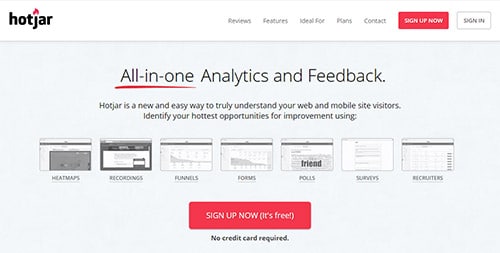
Hotjar offers heat maps, live recordings, funnel analysis, polls, surveys and even live user tests via screen sharing.
Crazy Egg
A while ago, Crazy Egg was a free service, but that’s not longer the case. They have various payment-options and if you have a look at the demo, you’ll notice that 9$ a month is not that much. If you prefer to have a free alternative for Crazy egg, you can just keep on reading…
I also wrote an extensive review about Crazy Egg if you’re interested in this tool. It includes a link, giving you the opportunity to subscribe for a 60 day free trial.
Smartlook
Smartlook is a bit of a special one in this list. Not only does it integrate session recordings, heatmaps, event tracking and funnels for the web environment, but also for native mobile apps. Both iOS as Android are possible via an SDK. Although still in beta, things are finally looking up for native app users.
The session recordings are pretty detailed and offer a lot of filtering possibilities. It also has a few other tricks up its sleeve. For example, you can add notes to the session or look at the console of the user. Another nice and useful touch is that you can connect the recording to individual users from your database through an API.
The heatmap track clicks, moves and scroll depth of the visit and you can filter them on several parameters. When setting up a new heatmap, you can either collect data from new visitors (and new data points) or use historical recordings to populate the heatmap.
With event tracking, you can inspect every element on your website. You can either use a specified CSS selector or their built-in event selector tool. On top of that, you can specify special events that track JS errors in the console. A handy tool for developers to track javascript errors.
Last but not least, Smartlook allows you to create funnels, giving you some better insights where in the customer journey people start to drop off.
Smartlook has a free subscription which allows you to track 1500 visits per month. Of course it’s limited in the amount of session recordings, the amount of generated heatmaps and the tracked platform. If you would like to track more sessions, generate more heatmaps and look at different platforms, you will need to upgrade to a Starters package (€19/month) or the Powers package (€79/month).
IMPORTANT NOTE: I have written a more extensive review about Smartlook, so if you’d like to know more about the tool, just head out over there.
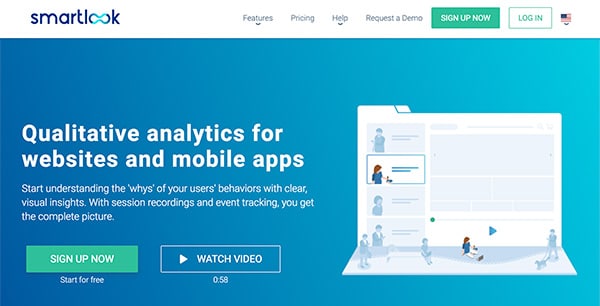
Smartlook offers all of the known features for the web environment and native mobile apps.
Plerdy
Plerdy was actually recommended by one of my readers, so I really wanted to have a look at it. And Oh boy, Plerdy doesn’t disappoint! Setting it up was like any other tool in this list and it went really quick. Going over the tool’s dashboard, it immediately noticed that they have plenty to offer.
The entire feature list is divided into 3 larger topics: UX Analysis, Smart forms and SEO alerts. Let us start with the UX Analysis.
Plerdy’s UX analysis contains the following features:
- Heatmaps
- Event tracking
- Click tracking
- Scroll depth
- Cursor hover
- Highlight text
- Cursor hover in percentages
- Sequence of clicks
- Traffic analysis
Plerdy also allows you to create smart forms and integrate it within your website. They have an entire list of forms of which you can choose from or you can create your own. Plerdy offers:
- Lead List
- Net Promotor Score (NPS)
- Statistics
- Traffic Sources
Last but not least, Plerdy can track your SEO status.
- SEO page analysis
- Integration of Google Search Console
Plerdy has a free subscription which allows you to track 2000 page views per day. Paid packages starting at 29$ per month, which allows you to track up to 10000 page views per day.

Mouseflow
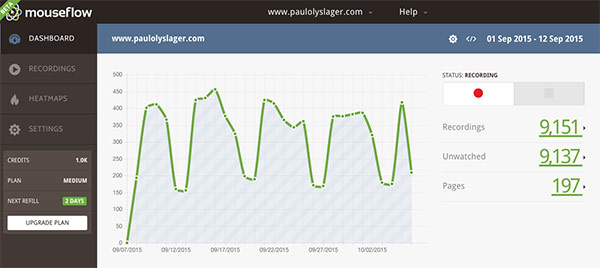
Next in line is Mouseflow. Besides a detailed mouse click heatmap, it also offers a mouse movement and scroll heatmap. But it doesn’t stop there.
Mouseflow is in fact a powerful web analytics package that gives you plenty of statistics and features to play around with. It records the pageviews, total visit length, interaction time (which I find very useful), bounce rates, loading time, response time and the scroll reach (in percentages and pixels).
On top of that, Mouseflow offers live streaming, a very nice feature with which you can follow your users live (only for paying subscriptions)! It also records whole visitor sessions, which you can playback in your browser or simply download to your hard drive to watch it whenever you want. These recordings include the mouse movements, clicks, scroll events and key strokes.
For only 10€ a month you get 1000 recorded sessions – which is a bargain – but if you’re still not sure you can always start with a free subscription.
IMPORTANT NOTE: Mouseflow has just released a new version of their tool. Check out the new Mouseflow.
Lucky Orange
Next one is Lucky Orange, which has more features to offer than any other tool mentioned in this list. They have session recordings, heat maps and funnels. On top of that, they have also integrated a live chat functionality, polls and form analytics.
The heat maps are divided into clicks, moves and scroll depth. So what’s so special then? Well, Lucky Orange doesn’t simply take a ‘snapshot’ of your web page but instead creates an interactive overlay as you browse your website. That’s right people. Finally a solution for dynamic content and interactive interfaces! No need to worry about about menus, drop downs or popups any more.
You can easily switch between screen sizes and event types. Filter on behaviour tags (similar behaviour), keywords, source, browser, etc. and create segments for frequently used filter combinations, making it possible to define your personas for example.
Lucky Orange has several pricing plans. Pretty pretty good value for money I might add, but, unfortunately no free subscriptions. However, readers of paulolyslager.com will enjoy a 30 day trial instead of the normal 7 days. Just sign up and they will make the necessary changes for you!

Lucky Orange – Finally a heat map solution for dynamic content and interactive interfaces.
MouseStats
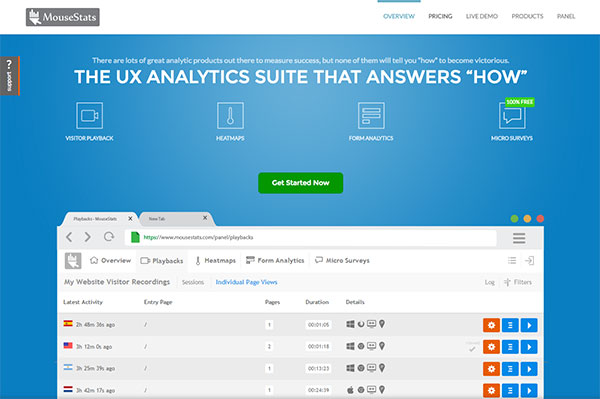
Next one in line is MouseStats, which has several features to offer. They have session playbacks, heatmaps, form analytics and surveys.
The heat maps are divided into clicks, moves, scroll reach, viewport overlap, attention and areastats. The coordinates of the clicks are pretty similar compared to the other tools but they seem somewhat less refined (think bigger blobs).
MouseStats has also included the services of Unbounce, Instapage and Optimizely, giving you the possibility to generate a different heat map per A/B test variant for example.
The session recordings will show you, besides the actual video, the duration of the visit, the amount of pages during the sessions and some other details such as OS, browser, screen size and whether it was a touch device or not. In all honesty, I’ve seen better implementations of this feature.
MouseStats has several paid plans available, but they also offer a free life-time plan. All of the above features are enabled in this free plan, but highly reduced in the amount of recordings.
Continue reading on the second page where you’ll find more alternatives for Crazy Egg.

What you should read next






Very accurate job!
Another solution to avoid performance issues, could be to have a separate server just for heatmap.
What do you think?
P.S.
I didn’t know CrazyEgg has got commercial, damn!
If the cost-benefit ratio was ok, then this would be a great solution… but only for those websites which attract a lot of visitors. More visitors means more clicks to be recorded, so they would certainly benefit of a second server.
great post, thanks kindly
You’re welcome Dave!
I am new to the world of web analytics and i think the functions are unbeleivable. I have an online private business and it has always been so frustrating to me how i could not observe the activity of my customers. I came accross ClickTale analytics on a similar blog and i tried out the free option offered and my eyes have been opened. I now feel confident to adjust my website according to the behaviour i can see in the videos and all the heatmaps. Its so simple and so effective, I wish i had found it earlier.
@Steve Mann: Thank you for the comment Steve. Since a few weeks now I’ve been testing ClickTale as well. I’ll let you know my findings as well.
Hi, I found your page when i was searching Google for sites related to this article. I have tell you, your site is good. I like the design too, its nice. I don’t have the time at the moment to fully read your website but I have noted it and I also registered for your RSS feed. I will be back in a day or two. Thanks for a great website.
@ArticleDirectory: And thank you for the nice comment! Hopefully you like the rest of the website as well. :)
Love the list thanks so much.
Regarding clickheat – I installed it on the checkout pages of a store to see how people used the page.
A while later the site owner complained that when he viewed the checkout pages he got the IE ‘this page contains secure and insecure content’ error, and he worried that this was reducing the conversion rate. I checked and checked and checked again, and I couldn’t find any non-https images.
Eventually I finally realised what was happening – it was the clickheat script that was the insecure content on the https page!
@Stuart: Hi Stuart, nice to hear that you like this list and thanks for your interesting comment. I’ve been using Clickheat sporadically for a few months now (actually only used it to write this article and test it a bit) and I never crossed this IE error message before. The implemented code from Clickheat seems a bit aggressive and maybe a good thing to keep it out of the secure checkout pages. I can imagine that the CR dropped down a bit because of this message, but maybe you can switch to a less intrusive package.
Although I find Clickheat’s system interesting (follow the mousemovements of the visitor), I prefer to use A/B testing in checkout pages to increase the CR.
Hi there,
Interesting article. We have also created our own heatmap service at http://intuitionhq.com, and at $9 a test we think it’s very reasonably priced. We’ve designed it to be simple, quick and easy to use, and we think it works pretty well in that respect.
If you’d like to give it a go, please email me back on this address, or contact us on twitter @intuitionhq – we’d happily set you up with some free tests if you’d like to have a play.
Cheers!
You should try http://mouseflow.com that gives you heatmaps on mouse movements and clicks, but more importantly records whole visitor sessions (including mouse movements, clicks, scroll events and keystrokes) and lets you watch the whole thing in your browser.
There are free plans as well as paid ones.
@Jacob: Hi Jacob, thanks for the offer. You can expect an email from me :) !
@Lasse: Hi Lasse, thanks for the great tip. I just subscribed myself to Mouseflow and I’m very curious for the result. I will update this article as soon as I have enough information.
Love this article altough i havnt found any perfect solution as for now, wich would be Heatmap + a simple wordpress plugin + Free
please keep this post updated !
@Julien: Don’t you worry Julien, i’m working on an update of this post! I hope to finish this soon!
Glad to read that :)
This article has been updated on the 13th of May 2010. More information on its way!
Thanks for the mention Paul, I notice you’re using Mouse Eye Tracking on this blog too. Let us know your feedback, we’re always looking to improve the product.
We’ve also created a plugin that makes it easy to setup Mouse Eye Tracking on wordpress websites, see:
http://wordpress.org/extend/plugins/picnet-mouse-eye-tracking-service-plugin/
@Paul Olyslager: @Paul, overall which of all these tools both the paid and free do you personally recommend and prefer?
By the way great review
@Owen McGab Enaohwo: Hi Owen and thank you for the reply. When I was doing the research for this article I had to know what Crazy Egg was all about in order to form a better opinion. I have to say that Crazy Egg is a very good heatmap system, but nothing more, noting less. For a paying alternative I would recommend Mouseflow because it gives you much more than a heatmap system. The live streaming is a very nice feature but it also provides you with plenty of statistics and a scroll heatmap. Don’t forget to retweet this article to get 500 free recordings :) .
As for a free alternative, I would go with clickdensity. It is similar to Crazy Egg but doesn’t have the nice interface.
I hope this will satisfy your question. If not, just ask!
@Paul Olyslager: After reading your blog post and asking my previous question, I installed the free Picnet and in a couple of months I will be moving on to Mouseflow (which is subscription based). I even compare Mouseflow to Clicktales and I think Mouseflow provide more bang for less money.
Fantastic article. I have just install mouseflow. I was between mouseflow and clicktale but the price was the main reason i choose mouseflow. My main concern is security. I have install also the proxy.php file in order to track shopping cart etc. How secure is this? Any ideas?
@gerorge: Hi, if your website is running SSL, all data transmitted to Mouseflow is also encrypted. You can even adjust the php proxy script so that it sends data to https://… instead of http://.
If you’re not using SSL then all data is transmitted unencrypted across the network, including the compressed mouseflow data.
If you want more information about Mouseflow security, feel free to post specific questions.
Lasse
@Lasse Schou: Thanks Lasse for the useful info, I couldn’t do a better job. I’m sure @gerorge could use it.
Thanks for this article, i will try clickdensity and mouseflow… i’ve already running on clickheat…
I love the mouseflow idea, it is combination of clickheat (http://www.labsmedia.com/clickheat/index.html) and clixpy (http://clixpy.com/)
nicely put together, thanks Paul for sharing
Does anyone know about the effects of using more than one of these services at the same time ?
I’m checking out Clicktale, SeeVolution, and have a free one page from Crazy Egg.
Is it a bad idea to have so many running ? Plus Google, Yahoo, etc. analytics ?
Thanks,
Ed
@Ed: Hi Ed, at the time I was writing this post I had ClickTale, Crazy Egg, Mouseflow and Google Analytics running. It didn’t give me any script problems, just make sure that everything works smoothly before you install something else. Loading time could be affected.
I hope this answers your question?
@Paul Olyslager: Thanks so much Paul!
Thanks for the article, twas very helpful.
Clickheat has been reported to place hidden links on your website, and can cause your site to drop from google rankings. Do a Google search on this, I’ve already found a few articles warning people of this.
I’ve tried mouseflow. Despite giving you an aesthetically pleasing heatmap, the states are extremely misleading and unreliable. I don’t advise it at all.
Clickdensity is crap.
Clicktale is amazing! Tis hands-down the best, but bloody expensive.
I’ve tried picnet before with poor results, but have just decided to give it a second go.
Another one to add to the list is Seevolution, which is new and free at the moment. Unfortunately I haven’t been able to get it to work properly on my site yet, but I’ll see how things go. (The support team is very helpful btw, but they don’t work weekends :( )
@Sammie Fields: Hi Sammie, thank you for your roundup. Please let uw know when you have some results of Seevolution (if you can get it to work that is)!
Here’s a guide to implementing ClickHeat to wordpress: http://www.kalvster.com/web/clickheat-wordpress-crazyegg.html
@Sammie Fields: Hi Sammie, could you please elaborate on the misleading and unreliable heatmaps? I’m thinking that you might have a centered website, but haven’t set the alignment and width in the Mouseflow control panel. This may lead to displaced heatmaps. Unfortunately Mouseflow cannot automatically detect the alignment and width of the website.
Lasse / Mouseflow
Hello,
I totally recommend mouseflow. This real time recording is an amazing feature and gives you real feedback from your visitors. It doesn’t support google maps and a couple of tiny things beacause it’s within other iframes etc. but that’s fair enough. I tried also Seevolution which seems promising but it’s not as helpful as mouseflow can be. It’s exactly what I was looking for. Thanks for the article.
Cheers, George
@George: Hi George, thanks for the reply. It looks like I have to try Seevolution as well then ! Thanks for the tip.
Hi,
Just wanted to say that this is an awesome post! Especially the new 2010 entries. Nice work my friend.
cheers
Peter
Great article, I’m going to link to it from my website, hope that’s ok.
Good article – don’t forget about Clickmap (english version available at http://www.clickmap.ch/en).
Clickmap offers real-time and inplace Usability Analytics with Heat-, Click- and Foldmaps. Over 20 segmentation filters let you analyze everything from Google search terms to Social Media Marketing. You can track dynamic websites aswell, and don’t worry about your web layout (centered, fluid etc.)… Clickmap takes care of that!
Cheers
Pascal
Hi Paul,
Here’s another heatmap tool for you: EhaviorClick™
Ehavior gives you the first 2000 clicks for free so that you can try it out and be convinced.
One of our products prime features is the integration with your Google Analytics account. This allows you to segment your click data by every advanced Google Analytics segment.
Some examples of use are:
– Evaluate paid (SEM) clicks against non-paid (organic) clicks.
– See where visitors that purchased from you clicked. See where those that did not purchase anything clicked.
– Evaluate new vs. returning visitors.
The only limitation is your imagination (and the data available in your Google Analytics account :-))…
Thanks for keeping this article updated. I use WordPress and find it seems to have a plugin for almost anything you can think of. These will definitely help me to improve my own website conversions and will be a good addition to my tool kit. Thanks
Try metrika.yandex.com. It is simple and powerful free web analytycs service from Russian Search Engine
It has heat maps, records of coursir moves and other staff.
Thanks for your information. I’ve double-checked and totally remove ClickHeat from my site. So a dirty trick.
Hi Paul,
Take a look at http://www.sessioncam.com – it provides great heatmaps for mouse movement, clicks, page scrolling and attention.
The heatmaps can be filtered so you can drill down to specific segments of interest.
SessionCam also provides a session replay tool so you can watch the recorded activity of visitors as well.
SessionCam offers a free as well as paid plan.
Hi Kevin,
thanks for letting me know. I think it’s about time for an update since so many new heatmap systems have found daylight. Stay tuned!
I’m just wondering what free means to you, as all the tools I’ve tested were Free Trial or paid, not Free Tools actually.
Hi Lucre,
thank you for your comment. This article has been written a while ago, so some heatmap applications might have changed their payment options. I will give you a quick overview:
– Feng-Gui is not longer a free service, as stated in the article. Minimum of $2,5 per image.
– The first heatmap WordPress-plugin hasn’t been updated in over 2 years, so I wouldn’t use it anymore.
– Clickheat and Corunet are OpenSource software and free of charge.
– ClickDensity offers a free trail of 30 days.
– Mouseflow has changed their payment options, with €10/month and 30 day money back guarantee.
– Picnet only has a free demo, which was mentioned in the original article.
– Patrick Wied’s heatmap system is an OpenSource JavaScript library and free of charge.
I hope this list answered your question a bit. At the moment I’m working on a new list, which will include both free and paying services.
Check out experiment.ly – it’s Free!
Thanks so much for the information. I have been browsing around looking for different options aside from CrazyEgg.
Happy Blogging :)
Ha-ha, I was just about to say that MouseFlow was missing from the list, when I saw there was actually a second page to this post.
Great job, Paul, a really priceless roundup for anyone looking for click tracking software.
I would like to point out that we found Corunet to be a useful solution at some point. It’s pretty flexible, but perhaps it takes a tech savvy person to implement.
Best,
Susan of WebMeUp.Com
Thanks Paul, you did a really great job here!
I personally use a killer combination of Mouseflow and Website Auditor for my projects.
First I polish up all on-site optimization aspects, like duplicate content, broken links, code errors, robot.txt, XML sitemap, plus analyze page elements where keywords can be strategically placed (title, headings, ALT text, meta tags)in WebSite Auditor. And then I use Mouseflow do check how fixing on-page issues impacts user behavior. This works all the way around too: if I discover that there are usability problems on site – and this is something MouseFlow is excellent at – I do use WebSite Auditor again to fix them out.
This is a great list, although some of these tools are no longer free.
You might also want to take a look at Click Tracking tool available on UsabilityTools http://usabilitytools.com/tools/click-tracking/#tool-description
There is a free trial option that allows to test up to for 10 000 pages for free. This particular tool have several benefits that are usually not available in other platforms, including heatmaps for dynamic website elements.
Hi Paul, I just launched http://heatmap.ca (August 7th, 2013) and it’s 100% Free.
It generates Click Heatmaps and offers Click and Tap Playback! It works with Fluid layouts so it will playback a user session if they are on a Mobile device or desktop computer. If you have media queries that change the layout on the page, when a mobile device hits it, we have a feature where you can enable Dynamic Content on the page and then apply the Heatmap or Play user sessions to reveal hot points on the dynamic elements! Playback of sessions overlays an optional path with arrows (click 1,2,3 etc). There is even an instant playback speed. The Dashboard runs on your site and works on a Smart Phone or Desktop computer. At heatmap.ca there is a page of visual analytics including clicks by Country, State, City, Time of Day, Day of week, Tablets, Phones, etc.
This is not a limited tool…you get 500,000 clicks per month, Unlimited Views, you can monitor 100 pages per month across multiple domains.
On a personal note, I thought it was about time this type of service was available to all small to medium sized businesses as a free service. I am giving something back to the community. Enjoy!
Rob
I welcome your feedback and if you have any questions, let me know.
You need consider http://www.mousestats.com/ in this comparison.
Hotspots User Tracker is a free WordPress plugin which provides heat maps for mouse clicks and touch screen taps. It also caters for responsive web design, difference devices and zoom levels. It’s free, no signup required. All of the data is stored locally in your database.
http://wordpress.org/plugins/hotspots/
Daniel.
This is a great list. I would like to add our website to this list: http://www.gazehub.com
Shahram
Paul,
What are your thoughts on the best methods of analyzing heat map/click map results writing a synopsis of them? I currently use CrazyEgg.
I want to try it now
Hi,
I used inspectlet.com for heatmap and wepify.com for CMS and they both works great! They have free plan.
Cheers
This is a new software that allows you to have a clear picture of your site. Includes heat maps, exit polls and feedback, online surveys, analysis of funnels and many other features.
It is the most complete tool of its kind.
Be sure to see it, because they are in pre launch at an incredible Price or even free. http://www.hotjar.com/4652
You can try http://www.hotjar.com/31612 It’s cheaper than CrazyEgg and it offer a lot of tools.
Other than crazyegg & inspectlet there’s also simpleheatmaps.com which is cheaper and has similar features.
I just tried out SimpleHeatmaps. Have a look at http://www.paulolyslager.com/heatmap-hot-or-not/4/ for the results.
I have signed up for hotjar, but I’m #38292 on the waiting list. Not sure if I’ll wait that long. It looks promising though.
Paul: An amazing post! For those who are interested we put together a guide to thinking through and setting up heat maps to optimize websites and conversions here: http://sumome.com/stories/guide-to-using-heat-maps For those who are interested SumoMe Has a free tool that works on any website here http://sumome.com/app/heat-maps
We are launching a new service HeatMapCo (http://heat-map.co). It doesn’t require any codes or scripts to works.
Just signed up
Let us know how it worked out for you!
I’ve just tried it out – Have a look at http://www.paulolyslager.com/heatmap-hot-or-not/3/ for the results.
Hi Paul, nice post! I’d also like to add Decibel Insight (DI) in within the mix. It’s similar to CrazyEgg, but on steroids. We’d love you and everyone else to give it a go for free! Please get in contact for more info :)
Disclaimer – I work for DI
Thanks for letting us know about your tool. Would I be able to get a try-out account?
Thanks for sharing! I have just discovered Heatmap software recently and it´s great. In case you are interested Visitlead Live chat also is offering this feature now in conjunction with its real time analytics: https://visitlead.com/features
Why don’t just buy a Heatmap Script or WordPress Plugin. It’s much better then pay other companies per month. I got one here http://goo.gl/nDYhIo
Great article, but there is an inaccuracy in the section on Sumome. I just starting using their heatmapping app, and found you can turn off tracking of internal users’ clicks – see documentation here: https://help.sumome.com/customer/en/portal/articles/1815240-disable-tracking-of-your-own-clicks
Thank you for reporting this. I didn’t notice this feature before. I made the necessary changes in the article! Thanks.
Great post Paul, thanks for sharing!
We woul’d be happy if you review our http://www.monkeytracker.cz click tracking (heatmap) tool. It’s really simple to use and cheap. Thanks for considering!
For iOS is great alternative Business Project Heat Mpas. Here: https://itunes.apple.com/us/app/business-project-heat-maps/id1094696085?l=cs&ls=1&mt=8
Great article, you should also compare these software to one that are using eye-tracking (www.realeye.io). As far as I know, most of decision making process is happening even before first mouse movement!
Hi Adam, thanks for sharing! I just gave it a first test run and although the results are not 100% accurate it does come pretty close. Will be testing a lot more.
Hi Paul thanks so much for this post – exactly what I was looking for. I want to try a heatmap on my clients’ sites, to see how visitors are consuming content. I have am a consultant (www.lisachapman.com ) one of my specialties is getting local companies ranked in one of the top 3 spots in Google’s Local Map 3-Pack. Optimizing content for Google’s preferences is part of our work for organic ranking and it’s every client’s challenge. Heatmaps seem to be a great tool to understand visitors’ interests. I’m excited to try it! I appreciate that you’ve included free options, so we can try several and get to know them before we commit to one. Even the paid tools are not very expensive, but it’s the time you spend learning the tools and setting it up that’s costly for any of them. I’d love to see that aspect covered more in reviews. You’ve mentioned it, which I appreciate. [Oh by the way, the links for SeeVolution are both 404s – Page Not Found. M French’s link is also 404.] Your tribe has added a lot of comments, for TONS of extra value. All around, love this post!. ps – please make comment links open in a new window – for convenience!
Hi Lisa,
thanks for the comment and a great idea to include the learning curve as one of the parameters as well.
It’s true that installing and setting up a tool can take quite some time, especially when you consider testing the impact on loading speed, data security, GDPR compliance, etc.
In my experience, integrating such tools on bigger websites does take longer than the average trial period, since the implementation is not often the highest priority on the backlog. This is in no way because of the tool itself, rather the internal process of integrating such 3rd party tools. Often you can extend the trial period just by explaining the situation to the software developers.
And thank you for letting me know about the dead link. That should be fixed now. Let me return the favour by letting you know that http://www.lisachapman.com ends up with a error 500.
Do any of these tools allow for integration with logs I already have for my website? What if I have click logs and I want to connect them to their UI tools?
Hi Wyatt, I haven’t come across this before. I assume that each of these tool generates its own specific log files. So unless they have integrated such a general upload functionality, I would say that it’s not possible to download a log file of tool X and upload it into tool Y.
Would be interesting to read your review of Plerdy Heatmap
Hi Gesano,
thanks for the suggestion. I will start by adding it to the list because it looks like a very promising tool. A full review will follow!
Cheers,
Paul
Hi, i dont have a website. i’m just interesting in neuromarketing tools. Why all bloggers only discuss well-known tools? why not to look at a new tools – they have a lot of capabilities. For ex. AI tool -predicts, where users will look while engaging with content.(i think is very important and interesting) It lets identify visual attention errors and get insights on user’s attention shifts without data collection. more about it https://www.attentioninsight.com/….
Thank you for a great article, Paul and Domas for mentionining Attention Insight – https://www.attentioninsight.com/about-the-technology/ .
Indeed, technology has been improving since and we think that it’s a great timing for a product enabling Pre-Launch Analytics versus mouse tracking, clicks etc. saving valuable time, making some key design decisions easier and more scientific in no time.
Hi Paul, would love see your review on Howuku Heatmap feature!
Hi Paul, great reviews! It would be great if you can review UX Sniff too.
It is a long established fact that a reader will be distracted by the readable content of a page when looking at its layout.